Turn on suggestions
Auto-suggest helps you quickly narrow down your search results by suggesting possible matches as you type.
Showing results for
- Hyland Connect
- Platform
- Alfresco
- Alfresco Archive
- Re: Date Validation in Aikau widget
Options
- Subscribe to RSS Feed
- Mark Topic as New
- Mark Topic as Read
- Float this Topic for Current User
- Bookmark
- Subscribe
- Mute
- Printer Friendly Page
Date Validation in Aikau widget


Options
- Mark as New
- Bookmark
- Subscribe
- Mute
- Subscribe to RSS Feed
- Permalink
- Report Inappropriate Content
03-01-2016 03:01 AM
Hello Guys,
I have a very basic requirement for which I am using Aikau widgets to develop.
The requirement is to have a form based selection of 'FROM' and 'To' dates. I am able to populate the Date textbox using "alfresco/forms/controls/DateTextBox" widget. However, I need to put a validation in which 'from' date should always be less than 'to'. Can someone help me achieve this. Thanks. Below is the piece of code that shows the dates selection.
<javascript>
var date = new Date();
var todayDate = date.toISOString();
model.jsonModel = {
widgets: [
{
id: "FROM_DATE",
name: "alfresco/forms/controls/DateTextBox",
config: {
label: "FROM",
name: "fromDate",
value: todayDate
}
},
{
id: "TO_DATE",
name: "alfresco/forms/controls/DateTextBox",
config: {
label: "TO",
name: "toDate",
value: todayDate
}
}
]};
</javascript>
I have a very basic requirement for which I am using Aikau widgets to develop.
The requirement is to have a form based selection of 'FROM' and 'To' dates. I am able to populate the Date textbox using "alfresco/forms/controls/DateTextBox" widget. However, I need to put a validation in which 'from' date should always be less than 'to'. Can someone help me achieve this. Thanks. Below is the piece of code that shows the dates selection.
<javascript>
var date = new Date();
var todayDate = date.toISOString();
model.jsonModel = {
widgets: [
{
id: "FROM_DATE",
name: "alfresco/forms/controls/DateTextBox",
config: {
label: "FROM",
name: "fromDate",
value: todayDate
}
},
{
id: "TO_DATE",
name: "alfresco/forms/controls/DateTextBox",
config: {
label: "TO",
name: "toDate",
value: todayDate
}
}
]};
</javascript>
Labels:
- Labels:
-
Archive
28 REPLIES 28


Options
- Mark as New
- Bookmark
- Subscribe
- Mute
- Subscribe to RSS Feed
- Permalink
- Report Inappropriate Content
09-15-2016 06:33 AM
It is possible to configure a variety of validation behaviours for form controls, but at the time of writing (when the latest release of Aikau is version 1.0.85) it is not possible to achieve what you require ... if you're reading this at any point onwards from Sept 15th 2016 then you might want to check what is available in later releases!
Ideally we would actually have some kind of range picker available in Aikau out-of-the-box for you to use and in the future we may have one. However, for the time being I think that your best option is to extend the existing DateTextBox widget and add an additional validator function that you can reference in your "validationConfig" for each form.
The approach I would take would be to extend the postMixInProperties function to create a subscription to the changes in value of the other date fields (I would make this a configurable option) to keep track of the value of that field and then add a validator function that ensures that the field is before or after the date value of the other field.
This commit to the Password widget shows how this approach might be made (this commit added the ability to confirm that one password field matched another, in your case you'd want to confirm that one Date was before or after another).
Hopefully that makes, sense - please reply if you need more information.
Options
- Mark as New
- Bookmark
- Subscribe
- Mute
- Subscribe to RSS Feed
- Permalink
- Report Inappropriate Content
10-13-2016 09:36 AM
FYI: I've just implemented a DateRange widget which will be available from the 1.0.91 Aikau release... see this pull request: AKU-1014: Added DateRange widget mapping by draperd · Pull Request #1255 · Alfresco/Aikau · GitHub


Options
- Mark as New
- Bookmark
- Subscribe
- Mute
- Subscribe to RSS Feed
- Permalink
- Report Inappropriate Content
10-20-2016 11:02 AM
Hi Dave Draper
I have some issue with DateTextBox. When i use chrome inspect code, i don't arrive to get value DateTexBox.
Please, can you explain me, how i get value DateTextBox widget aikau?
Thanks !
Options
- Mark as New
- Bookmark
- Subscribe
- Mute
- Subscribe to RSS Feed
- Permalink
- Report Inappropriate Content
10-20-2016 11:26 AM
I don't quite understand the question... what exactly are you trying to do?
If you want to get the value of a DateBox programmatically then you can call the getValue() function, however you would normally expect to use the DateTextBox in a Form and it's value would automatically be included in the payload published when submitting the form.
If you're trying to find the code to get the value in the DateTextBox source then you won't it directly as all form controls inherit from the BaseFormControl widget so quite a lot of the form control functionality is defined there (or in the associated modules that are also mixed into it).
If you're looking to find the source of DateTextBox itself in the Chrome inspector then you won't find it as a single resource because Surf aggregates all of the widgets source files together into a single resource to reduce HTTP handshaking. The fastest way to get to this source file is to use CTRL-P within the inspector and type "surf" - the first result is usually the Aikay source file - you'd be able to find the DateTextBox source within it.
Options
- Mark as New
- Bookmark
- Subscribe
- Mute
- Subscribe to RSS Feed
- Permalink
- Report Inappropriate Content
10-20-2016 12:27 PM
Thanks for your reply.
For example, I have Two widgets DateTextBox and my question is how i get widget value filterDateFrom in filterDateTo ?
/* Found in pages folder*/
var filterDateFrom = {
name: "alfresco/forms/controls/DateTextBox",
config: {
fieldId: "INVOICE_DATE_FROM",
name: "filterInvoiceDateFrom",
value: "2016-01-01",
label: "title.invoiceDateFrom",
description: "label.description.from",
}
};
var filterDateTo = {
name: "alfresco/forms/controls/DateTextBox",
config: {
fieldId: "INVOICE_DATE_TO",
name: "filterInvoiceDateTo",
value: "2016-12-31",
label: "title.invoiceDateTo",
description: "label.description.to",
}
};
model.jsonModel = {
services: [
// Here module services
]
Widgets:[
//Here my widget
]
}
/* Found in widget folder*/
define(["dojo/_base/declare",
"dijit/_WidgetBase",
"dojo/_base/lang",
"alfresco/core/Core",
"alfresco/core/CoreXhr",
"alfresco/core/CoreWidgetProcessing",
"dojo/dom-construct",
"dojo/dom",
"dojo/query",
"service/constants/Default"],
function(declare, _Widget, lang, Core, AlfCoreXhr, CoreWidgetProcessing, domConstruct, dom, query, AlfConstants) {
return declare([_Widget, Core, AlfCoreXhr, CoreWidgetProcessing], {
constructor: function _constructor(args) {
lang.mixin(this, args);
this.alfSubscribe("_valueChangeOf_INVOICE_DATE_TO", lang.hitch(this, "_onPayloadReceiveInvoiceDateTO"));
},
_onPayloadReceiveInvoiceDateTO: function gfp_services__getAllInvoice(payload) {
var dateFrom= (dojo.query("input[name=\"filterInvoiceDateFrom\"]")[0]).value;//Content from DateFrom
console.log(dateFrom); // I WANT TO SHOW THE VALUE FROM DATEFROM WIDGET
},
});
});
Options
- Mark as New
- Bookmark
- Subscribe
- Mute
- Subscribe to RSS Feed
- Permalink
- Report Inappropriate Content
10-20-2016 01:52 PM
Why not just use the DateRange widget (you'll need Aikau 1.0.91 onwards)? This single form control provides two DateTextBox widgets for selecting a date range (with validation to ensure that the "from" date is before the "to" date). A single value is returned with a custom delimiter to split the date values.
Options
- Mark as New
- Bookmark
- Subscribe
- Mute
- Subscribe to RSS Feed
- Permalink
- Report Inappropriate Content
10-21-2016 05:11 AM
Hi Dave Draper
I'm just coming to change my version Aikau to Aikau 1.0.91 and I have the same problem to access to the value widget in Dojo. I rephrase my question. How get value widget in another widget with aikau.
Sorry for my english.
Thanks for advance.
Options
- Mark as New
- Bookmark
- Subscribe
- Mute
- Subscribe to RSS Feed
- Permalink
- Report Inappropriate Content
10-21-2016 05:33 AM
OK... I think you're approaching this problem incorrectly...
Can you explain to me where the bottom section of code is from exactly? You really shouldn't be trying to use dojo.query to find the widgets... to start with, it won't actually be returning the widgets at all (just fragments of the DOM) so you won't be able to call their functions.
I think I really need to see the full source (of both your model and your custom widget/service code) and to understand the use case that you're trying to solve in order to be able to help you.
Options
- Mark as New
- Bookmark
- Subscribe
- Mute
- Subscribe to RSS Feed
- Permalink
- Report Inappropriate Content
10-21-2016 08:50 AM
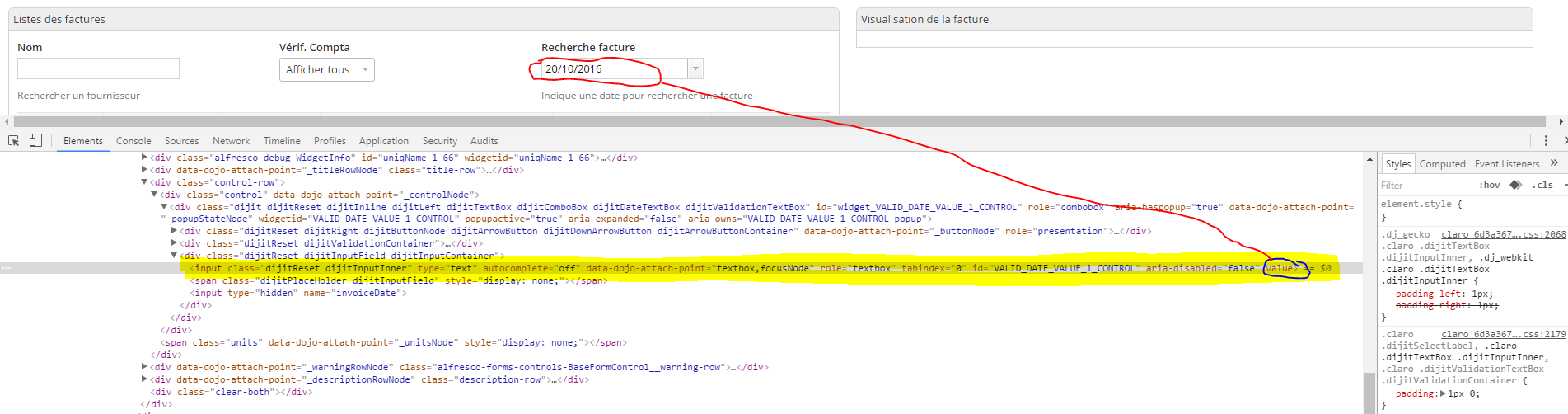
I'm wondering how i can get the value with dojo module Dom or Query in aikau module widget or sevice.
This is the screenshot:

Related Content
- Botón crear sitio usando Aikau in Alfresco Archive
- Aikau widget library documentation not available in Alfresco Forum
- Aikau Widget Reference Not Available in Alfresco Forum
- Override/extend Aikau Widget or JS File in Alfresco Forum
- Aikau textbox not being populated by subscription topic in Alfresco Forum
Getting started
Tags
Find what you came for
We want to make your experience in Hyland Connect as valuable as possible, so we put together some helpful links.
