Turn on suggestions
Auto-suggest helps you quickly narrow down your search results by suggesting possible matches as you type.
Showing results for
- Hyland Connect
- Platform
- Alfresco
- Alfresco Archive
- Forms engine with mode='create'
Options
- Subscribe to RSS Feed
- Mark Topic as New
- Mark Topic as Read
- Float this Topic for Current User
- Bookmark
- Subscribe
- Mute
- Printer Friendly Page
Forms engine with mode='create'


Options
- Mark as New
- Bookmark
- Subscribe
- Mute
- Subscribe to RSS Feed
- Permalink
- Report Inappropriate Content
06-29-2010 09:52 AM
Hi,
How do you make a create-form for a new type in Share?
I created an edit-form given a noderef. But when I want to generate a form for my custom model, I have some problems. The wiki says that "itemKind:type" is not supported:
I would configure the form-engine as follows:
It generates a form with all the fields, so also the "Node DB Identifier" and "Store Protocol:" fields
[img]http://lh6.ggpht.com/_J51uckDMXcg/TCn5ul9CihI/AAAAAAAAA3k/Iht5Ss4B_ek/s912/Vastleggen%20in%20volledi...[/img]
I looked at the blog-application in Share but they don't use the form engine, right? Is there something in Share that does use the form engine to create a form in mode="create"?
How do you make a create-form for a new type in Share?
I created an edit-form given a noderef. But when I want to generate a form for my custom model, I have some problems. The wiki says that "itemKind:type" is not supported:
itemKind: The "kind" of item the form is for, the only supported kind currently is "node".
I would configure the form-engine as follows:
itemKind=type and itemId=custom:model
It generates a form with all the fields, so also the "Node DB Identifier" and "Store Protocol:" fields
[img]http://lh6.ggpht.com/_J51uckDMXcg/TCn5ul9CihI/AAAAAAAAA3k/Iht5Ss4B_ek/s912/Vastleggen%20in%20volledi...[/img]
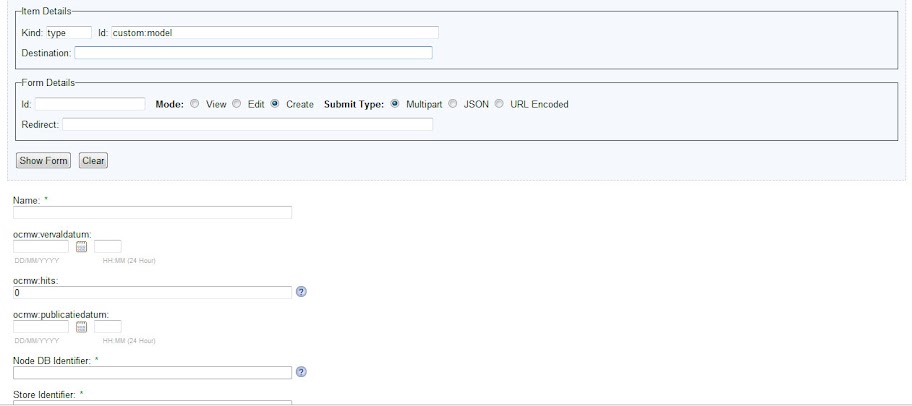
I looked at the blog-application in Share but they don't use the form engine, right? Is there something in Share that does use the form engine to create a form in mode="create"?
Labels:
- Labels:
-
Archive
2 REPLIES 2
Options
- Mark as New
- Bookmark
- Subscribe
- Mute
- Subscribe to RSS Feed
- Permalink
- Report Inappropriate Content
06-30-2010 09:48 AM
Hi,
In Share the "create-content" page uses the form-service with kind "type" (mode create). In the form-configuration of 'cm:content' type I saw that definition of kind "type" forms (on create, with nodeType as parameter) is not the same like kind "node" form (on editing, with nodeRef as parameter).
For kind "node" use:
For kind "type" use:
Note: This works for my custom type in Alfresco Enterprise Share 3.3. I don't know in which versions this feature is avaiable.
Sincerely,
decla
In Share the "create-content" page uses the form-service with kind "type" (mode create). In the form-configuration of 'cm:content' type I saw that definition of kind "type" forms (on create, with nodeType as parameter) is not the same like kind "node" form (on editing, with nodeRef as parameter).
For kind "node" use:
<config evaluator="node-type" condition="my:CustomType">For kind "type" use:
<config evaluator="model-type" condition="my:CustomType">Note: This works for my custom type in Alfresco Enterprise Share 3.3. I don't know in which versions this feature is avaiable.
Sincerely,
decla
Options
- Mark as New
- Bookmark
- Subscribe
- Mute
- Subscribe to RSS Feed
- Permalink
- Report Inappropriate Content
07-01-2010 04:07 AM
Thanks 
Forgot about the "model-type" in the config.
Forgot about the "model-type" in the config.

Related Content
- The Definitive Guide to Alfresco Search Community in Alfresco Blog
- Pulling Your PaaS Logs on Demand: A Practical Guide to the v2 Log API in Alfresco Blog
- What "=" Really Does to Your Alfresco Query in Alfresco Blog
- Alfresco Community Edition 26.2 Release Notes in Alfresco Blog
- Adding Resumable, Any-Size Downloads to ACA or ADW: A Dev/DevOps Guide in Alfresco Blog
Getting started
Tags
Find what you came for
We want to make your experience in Hyland Connect as valuable as possible, so we put together some helpful links.
