Turn on suggestions
Auto-suggest helps you quickly narrow down your search results by suggesting possible matches as you type.
Showing results for
- Hyland Connect
- Platform
- Alfresco
- Alfresco Archive
- Create Deployment Artifacts option not working Ple...
Options
- Subscribe to RSS Feed
- Mark Topic as New
- Mark Topic as Read
- Float this Topic for Current User
- Bookmark
- Subscribe
- Mute
- Printer Friendly Page
Create Deployment Artifacts option not working Please Help


Options
- Mark as New
- Bookmark
- Subscribe
- Mute
- Subscribe to RSS Feed
- Permalink
- Report Inappropriate Content
02-17-2012 12:58 PM
After following the eclipse setup instructions in the user guide I added my own process to src/main/test in the activiti-engine-examples
Then i deleted the activiti-engine-examples.bar and activiti-engine-examples.jar files from the project.
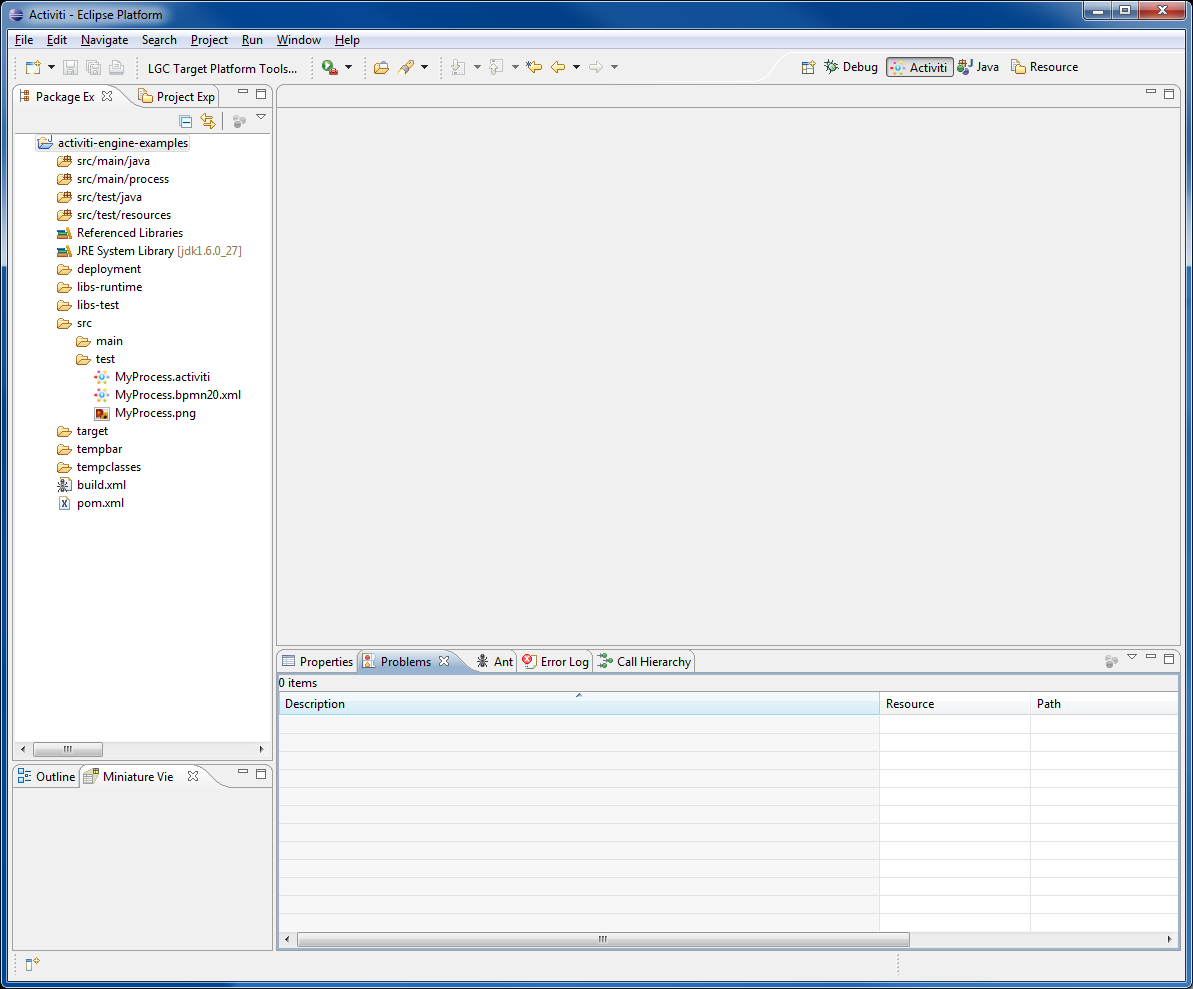
Then I tried using the MB3 option Create Deployment Artifacts to create a new bar and jar files but nothing happens when I do that.
No indicator/progress nothing and no bar or jar files are created.
There is nothing in my problems view and nothing in the error log. The xml seems to be fine.
Ive attached an image of my eclipse workspace.
Can anyone please help me figure out whats going on.
Thank you.
Then i deleted the activiti-engine-examples.bar and activiti-engine-examples.jar files from the project.
Then I tried using the MB3 option Create Deployment Artifacts to create a new bar and jar files but nothing happens when I do that.
No indicator/progress nothing and no bar or jar files are created.
There is nothing in my problems view and nothing in the error log. The xml seems to be fine.
Ive attached an image of my eclipse workspace.
Can anyone please help me figure out whats going on.
Thank you.
Labels:
- Labels:
-
Archive
ActivitiProject.png
91 KB
15 REPLIES 15
Options
- Mark as New
- Bookmark
- Subscribe
- Mute
- Subscribe to RSS Feed
- Permalink
- Report Inappropriate Content
02-21-2012 04:19 PM
If you're running the process in the Activiti demo setup, you should make sure your classes are on Tomcat's classpath when starting Activiti - that is, the classes are not and should not be part of the .bar file. If you look in your deployment folder in the project, you can see there's also a .jar file that's created. If you have the class in the same project, it should be in that jar, so it's all ready-made for you. Otherwise, you will need to create a jar containing the class yourself. Then you can drop the jar in Tomcat's lib directory for a quick solution. Most approaches for a more "enterprisey" solution tend to suggest repackaging activiti-rest and including the jar using Maven. You can then run that war on any container, because it contains Activiti, the REST API and your process' classes.
Thanks so much. that worked. It does need to be in the lib of the activiti explorer webapp in Apache as mentioned in other posts in the forum. By mistake I had two versions of apache installed and i kept putting it in the wrong Apache all this time thats why it didnt work. Its working now.
In regards to the Enterprisey solution you mentioned, we wish to use the activiti engine within our application which has the actual process classes and where we would create the delegates. We dont use J2EE only J2SE. So when you say Activiti and REST API, exactly which JARs would I need to include in my application? Which ones are needed to generate BPMN on the fly and create a process definition and run the process?

Options
- Mark as New
- Bookmark
- Subscribe
- Mute
- Subscribe to RSS Feed
- Permalink
- Report Inappropriate Content
02-21-2012 04:28 PM
Good to hear you got it working.
What I meant is that you run your processes by repackaging the activiti-rest project from Activiti, as a whole. To that, you then add your own jar files for the dependencies on service task delegates.
The parts you at least need are in activiti engine, but that's included already by activiti-rest.
What I meant is that you run your processes by repackaging the activiti-rest project from Activiti, as a whole. To that, you then add your own jar files for the dependencies on service task delegates.
The parts you at least need are in activiti engine, but that's included already by activiti-rest.
Options
- Mark as New
- Bookmark
- Subscribe
- Mute
- Subscribe to RSS Feed
- Permalink
- Report Inappropriate Content
10-11-2012 07:20 AM
Hi All,
I am trying to upload a bar file but it throws the below error when i used a service Task. Could you help me with this? I have tried all the above and still it does not work.
Error: 'resultVariableName' not supported for service tasks using 'class' | document_processing.bpmn.xml line 10 column 164
here is the bpmn file(Attaching the same):
Thanks,
Raj
I am trying to upload a bar file but it throws the below error when i used a service Task. Could you help me with this? I have tried all the above and still it does not work.
Error: 'resultVariableName' not supported for service tasks using 'class' | document_processing.bpmn.xml line 10 column 164
here is the bpmn file(Attaching the same):
<definitions xmlns="http://www.omg.org/spec/BPMN/20100524/MODEL" xmlns:xsi="http://www.w3.org/2001/XMLSchema-instance" xmlns:activiti="http://activiti.org/bpmn" xmlns:bpmndi="http://www.omg.org/spec/BPMN/20100524/DI" xmlns:smileysurprised:mgdc="http://www.omg.org/spec/DD/20100524/DC" xmlns:smileysurprised:mgdi="http://www.omg.org/spec/DD/20100524/DI" typeLanguage="http://www.w3.org/2001/XMLSchema" expressionLanguage="http://www.w3.org/1999/XPath" targetNamespace="http://www.activiti.org/test">
  <process id="document_processing" name="Document Processing">
    <startEvent id="startevent1" name="Start"></startEvent>
    <serviceTask id="task_indexing" name="Indexing (Service Task)" activiti:class="com.unisys.activiti.prototype.IndexService" activiti:resultVariableName="input"></serviceTask>
    <endEvent id="endevent1" name="End"></endEvent>
Thanks,
Raj


Options
- Mark as New
- Bookmark
- Subscribe
- Mute
- Subscribe to RSS Feed
- Permalink
- Report Inappropriate Content
10-11-2012 08:43 AM
You can only use a "resultVariable" to store the result of a SCRIPT-task. If you want to store some kind of result from a service-task, you should just set any variable you'd like on the DelegateExecution you get passed in the execute() method.
Options
- Mark as New
- Bookmark
- Subscribe
- Mute
- Subscribe to RSS Feed
- Permalink
- Report Inappropriate Content
10-01-2013 10:04 AM
how to create a bar file? can any one please tell me..
Options
- Mark as New
- Bookmark
- Subscribe
- Mute
- Subscribe to RSS Feed
- Permalink
- Report Inappropriate Content
10-02-2013 06:01 AM
Create a zip-file with all needed processes/filed and rename to *.bar

Related Content
- The Definitive Guide to Alfresco Search Community in Alfresco Blog
- Pulling Your PaaS Logs on Demand: A Practical Guide to the v2 Log API in Alfresco Blog
- Alfresco Community Edition 26.2 Release Notes in Alfresco Blog
- Bring AI agents to Alfresco safely with the new Docker Sandboxes kit in Alfresco Blog
- Bring Alfresco Search to 2026: Vanilla Solr 9, Java 17, and an invitation to the Community (by Jeci) in Alfresco Blog
Getting started
Tags
Find what you came for
We want to make your experience in Hyland Connect as valuable as possible, so we put together some helpful links.
