Keycloak authentification APS


Options
- Mark as New
- Subscribe to RSS Feed
- Permalink
02-28-2019 10:04 AM
Hi,
I have a problem when I try to connect keycloak to APS
keycloak version: 3.4.3
APS version: 1.9.01
ACS version : 6.1
«localhost:9080/activiti-app» redirects to :
then, after authentication, to

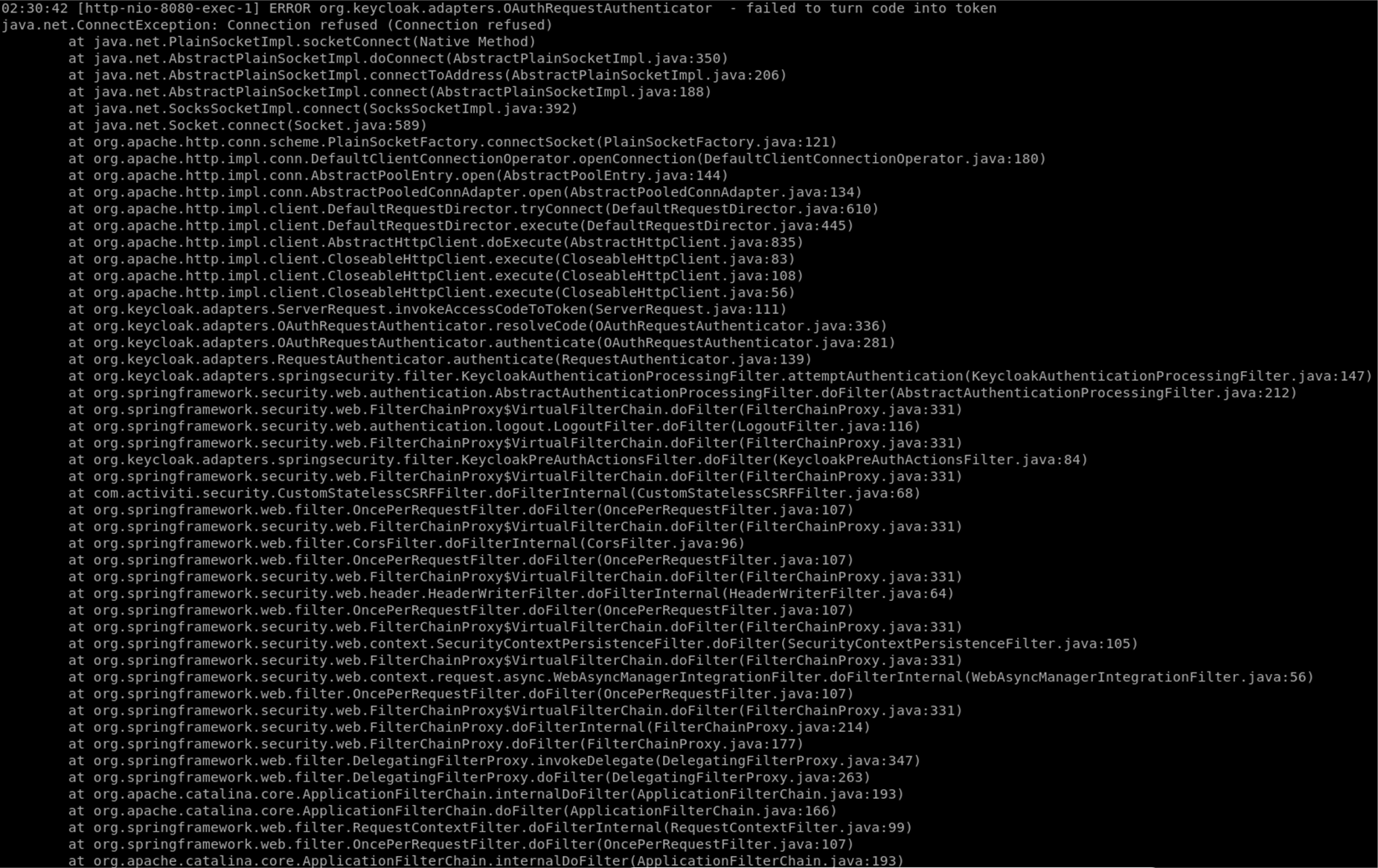

activiti-identity-service.properties
# --------------------------------
# IDENTITY SERVICE (i.e. Keycloak)
# --------------------------------
keycloak.enabled=true
keycloak.realm=alfresco-dbp
keycloak.auth-server-url=http://localhost:8080/auth
keycloak.ssl-required=none
keycloak.resource=alfresco-client
keycloak.principal-attribute=email
# set to true if access type is public for this client in keycloak
keycloak.public-client=true
keycloak.always-refresh-token=true
keycloak.autodetect-bearer-only=true
keycloak.token-store=cookie
keycloak.enable-basic-auth=true
alfresco-global.properties
jodconverter.enabled=true
# Identity Service (i.e. Keycloak)
# --------------------------------
# UNCOMMENT TO ENABLE Identity Service (i.e. Keycloak) for ACS
authentication.chain=identity-service1:identity-service,alfrescoNtlm1:alfrescoNtlm
identity-service.authentication.enabled=true
identity-service.enable-basic-auth=true
identity-service.authentication.defaultAdministratorUserNames=admin
identity-service.authentication.validation.failure.silent=false
identity-service.auth-server-url=http://localhost:8080/auth
identity-service.realm=alfresco-dbp
identity-service.resource=alfresco-client
identity-service.public-client=true
identity-service.ssl-required=none
Bassam Al-Sarori
Labels:
- Labels:
-
Alfresco Process Services
7 REPLIES 7


Options
- Mark as New
- Subscribe to RSS Feed
- Permalink
03-01-2019 04:33 AM
Looks like APS isn't able to connect to Keycloak. Are they both running on different containers?
Options
- Mark as New
- Subscribe to RSS Feed
- Permalink
03-01-2019 05:05 AM
Thanks,
Yes, different containers
Options
- Mark as New
- Subscribe to RSS Feed
- Permalink
03-01-2019 09:52 AM
The Keycloak URL isn't correct it should point to the Keycloak instance. I'm not sure how do it but you look into how to make the Keycloak accessible to APS. I guess docker has a way to make two containers accessible to each other.
keycloak.auth-server-url=http://localhost:8080/auth
Options
- Mark as New
- Subscribe to RSS Feed
- Permalink
03-01-2019 10:20 AM
The Keycloak URL is correct when i call this URL
«localhost:9080/activiti-app» redirects me to :
And the two dockers are accessible to each other
I don't understand your response
Options
- Mark as New
- Subscribe to RSS Feed
- Permalink
03-01-2019 11:27 AM
The URL is pointing to localhost which isn't correct since Keycloak is on a different docker.
Options
- Mark as New
- Subscribe to RSS Feed
- Permalink
03-01-2019 11:32 AM
In the exception you posted it's clear that Keycloak is unreachable "Connection refused".
Options
- Mark as New
- Subscribe to RSS Feed
- Permalink
02-18-2020 02:02 PM
I dont know if the problem was the same or similiar but in my case I had to set the "Require SSL" to NONE on the REALM, because the URL validation token has to be SSL and I has a self signed certificate
I don't understand why the error is 404 (I think this is wrong because is very confusing) but the real issue is for conection between APS and the Keycloak.
