Turn on suggestions
Auto-suggest helps you quickly narrow down your search results by suggesting possible matches as you type.
Showing results for
- Hyland Connect
- Platform
- Alfresco
- Alfresco Forum
- Re: How to use Gateways
Options
- Subscribe to RSS Feed
- Mark Topic as New
- Mark Topic as Read
- Float this Topic for Current User
- Bookmark
- Subscribe
- Mute
- Printer Friendly Page


Options
- Mark as New
- Bookmark
- Subscribe
- Mute
- Subscribe to RSS Feed
- Permalink
- Report Inappropriate Content
07-04-2018 03:23 AM
Hi, I'm using Activiti 6 and I would like to understand how you choose the direction of a gateway.
In particular I would like to know if through a radio button inside a form, I can condition this choice.
Labels:
- Labels:
-
Alfresco Process Services
1 ACCEPTED ANSWER


Options
- Mark as New
- Bookmark
- Subscribe
- Mute
- Subscribe to RSS Feed
- Permalink
- Report Inappropriate Content
07-11-2018 04:16 AM
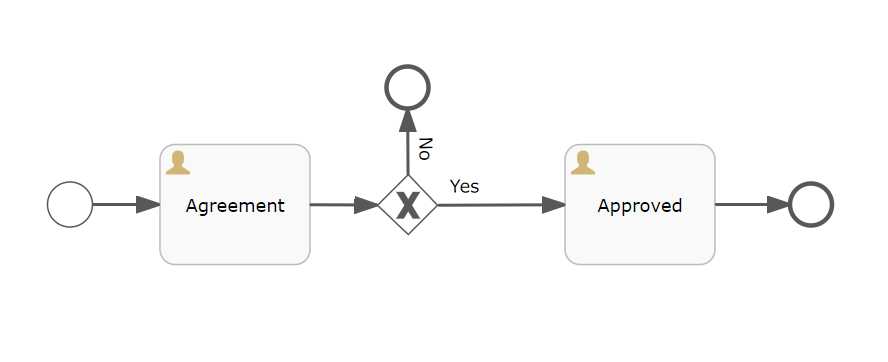
On the arrow "Yes" write flow condition as follows
${agree == "Yes"}
to "No"
${agree == "No"}
RadioExampleApp.zip
7 KB
5 REPLIES 5
Options
- Mark as New
- Bookmark
- Subscribe
- Mute
- Subscribe to RSS Feed
- Permalink
- Report Inappropriate Content
07-05-2018 12:08 AM
Hi You can use as follows(it's just an example). Refer any tutorial(https://www.omg.org/news/meetings/workshops/SOA-HC/presentations-2011/14_MT-2_Brookshier.pdf )
TestProcessRadio.zip
9 KB
Options
- Mark as New
- Bookmark
- Subscribe
- Mute
- Subscribe to RSS Feed
- Permalink
- Report Inappropriate Content
07-11-2018 03:34 AM
Hi, I tried to download the file and to create the form as you told me, only that going to create the app to test the whole, give me an error.
How can I do to solve this problem?
Options
- Mark as New
- Bookmark
- Subscribe
- Mute
- Subscribe to RSS Feed
- Permalink
- Report Inappropriate Content
07-11-2018 04:16 AM
On the arrow "Yes" write flow condition as follows
${agree == "Yes"}
to "No"
${agree == "No"}
RadioExampleApp.zip
7 KB
Options
- Mark as New
- Bookmark
- Subscribe
- Mute
- Subscribe to RSS Feed
- Permalink
- Report Inappropriate Content
07-11-2018 06:24 AM
Seems to work! Thanks a lot, I leave the question open for a couple of days in case I need anything, then I close it. Friendly.


Options
- Mark as New
- Bookmark
- Subscribe
- Mute
- Subscribe to RSS Feed
- Permalink
- Report Inappropriate Content
a week ago
n Activiti 6, the direction of an exclusive gateway is not normally chosen directly from a form element like a radio button. The gateway evaluates the conditions defined on the outgoing sequence flows, usually based on process variables.
You can absolutely use a form field to influence the decision, though. For example, store the selected radio button value as a process variable, then define expressions/conditions on the outgoing flows that check that variable and route the execution accordingly.
Something like: user selects option A → variable gets value A → gateway condition ${choice == 'A'} sends the process down that path.
The same idea applies to other workflow decisions too — the UI collects data, and the process engine handles the routing logic. If you’re also dealing with payment or external workflow integrations, understanding the underlying provider flow can help; this useful guide on acquiring banks gives a good overview of how transaction routing works on the payment side.
Hope that helps. The key point is: don’t try to make the form control the gateway directly; make the form set variables and let the BPMN logic decide.

Related Content
- 502 Bad Gateway error when attempting to upload files larger than 100 MB. in Alfresco Forum
- exclusive Gateway needs a answer to go on, help me in Alfresco Forum
- Gateway Xor Unnecessary in Alfresco Forum
- Tech Talk Live on Alfresco Java out-of-process SDK and Alfresco Event Gateway - 4/20/22 in Alfresco Forum
- Event gateway docker-compose not working in Alfresco Forum
Getting started
Explore our Alfresco products with the links below. Use labels to filter content by product module.
