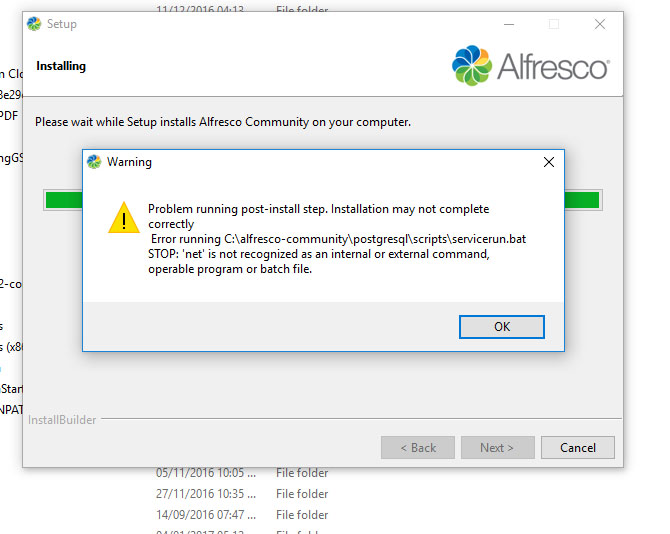
Installation error on windows 10 64bit


Options
- Mark as New
- Subscribe to RSS Feed
- Permalink
12-31-2016 01:23 AM
what could be the issue i get this error during installation on windows 10 using the latest release
<img src="http://uimg.in/images/2016/12/31/6PKdIFyL.jpg" alt="6PKdIFyL.jpg" border="0" />
Labels:
- Labels:
-
Archive
8 REPLIES 8





Options
- Mark as New
- Subscribe to RSS Feed
- Permalink
01-03-2017 10:44 PM
Please try to specify localhost to 127.0.0.1 or your ip address in the hosts( C:\WINDOWS\system32\drivers\etc\hosts) file
Options
- Mark as New
- Subscribe to RSS Feed
- Permalink
01-05-2017 07:52 AM
localhost is already specified.....xampp is also running
Options
- Mark as New
- Subscribe to RSS Feed
- Permalink
01-05-2017 09:44 AM
you should install alfresco using Windows administrator account.
Options
- Mark as New
- Subscribe to RSS Feed
- Permalink
01-07-2017 03:25 AM
thank you for quick reply....when i in stall i run as an administrator....could the issue be pstgressql not communicating ?
Options
- Mark as New
- Subscribe to RSS Feed
- Permalink
01-05-2017 06:33 AM
 this is another problem i get during installation.....after instalation .i have to enable all the services from manager windows.exe but still i cant able to login
i cant login
user: admin
password: admin
user: alfresco
pass:admin
i have also tried to # password from C:\alfresco-community\tomcat\shared\classes\alfresco-global.properties
but nothing works......any help?
